1. Overview
This challenge is about analyzing the Windows Event Logs to investigate Remote Desktop Protocol (RDP) bruteforce attempts. It’s includes analyzing a large volume log of Audit failures to identify specific Indicator of Compromises (IoCs).
Tools used
- Windows Events Log Viewer to extract information about the bruteforce event.
- TimelineExplorer.exe (Zimmerman-Tools) for analyzing attempted events on the host.
2. Initial analysis
Scenario
Can you analyze logs from an attempted RDP bruteforce attack?
One of our system administrators identified a large number of Audit Failure events in the Windows Security Event log.
There are a number of different ways to approach the analysis of these logs! Consider the suggested tools, but there are many others out there!
In this challenge, we are provided with 3 evidence files:
BTLO_Bruteforce_Challenge.txt: A raw text export of the Windows Security Event logs.BTLO_Bruteforce_Challenge.csv: The log data structured in a tabular format. Each column has a specific log field (e.g., Event ID, Account Name, IP Address).BTLO_Bruteforce_Challenge.evtx: A native binary file format for Windows Events Log Viewer.
3. Q&A
T-1. How many Audit Failure events are there? (Format: Count of Events)?
Opening the file BTLO_Bruteforce_Challenge.csv in TimelineExplorer.exe, we can count the number of failed login attempts by Event ID: 4625 (failed logon attempt):
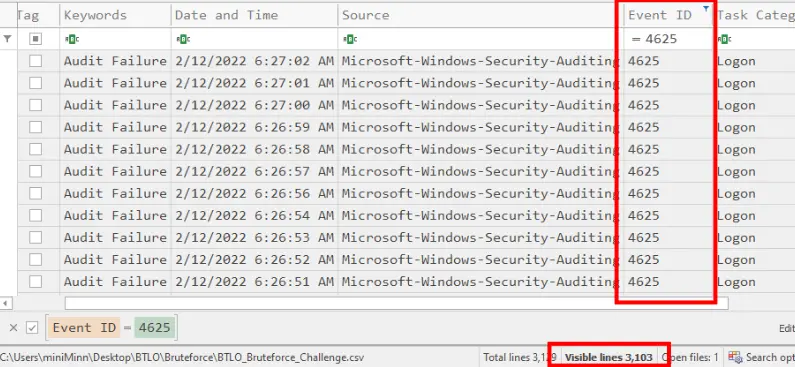
This event is generated by Microsoft Windows Security Auditing provider. Whenever the authentication fails, it captures the details of target account, src IP, logon type along with specific failure reasons.
If the Audit Logon policy weren’t enabled on the host, we wouldn’t be able to see these attempts in the security logs.
T-2. What is the username of the local account that is being targeted? (Format: Username)
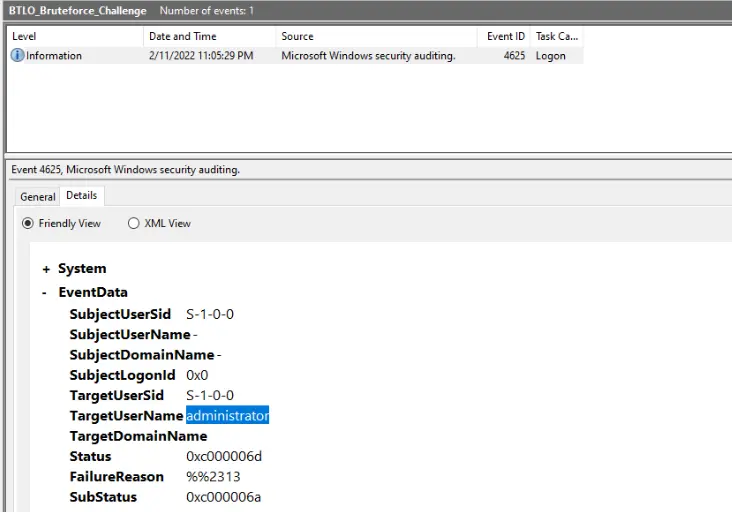
Looking BTLO_Bruteforce_Challenge.evtx in Windows Event Logs Viewer, we can find the username administrator was targeted for logon attempts:
T-3. What is the failure reason related to the Audit Failure logs? (Format: String)
Looking up the FailureReason %%2313, it means that username is unknown or password is incorrect, indicating “Unknown username or bad password” as failure reason.
T-4. What is the Windows Event ID associated with these logon failures? (Format: ID)
The event ID 4625 is associated with these logon failures.
T-5. What is the source IP conducting this attack? (Format: X.X.X.X)
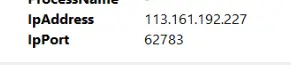
Looking at Windows Events Viewer again, the src IP address 113.161.192.227 is captured as the one who tried to logon:
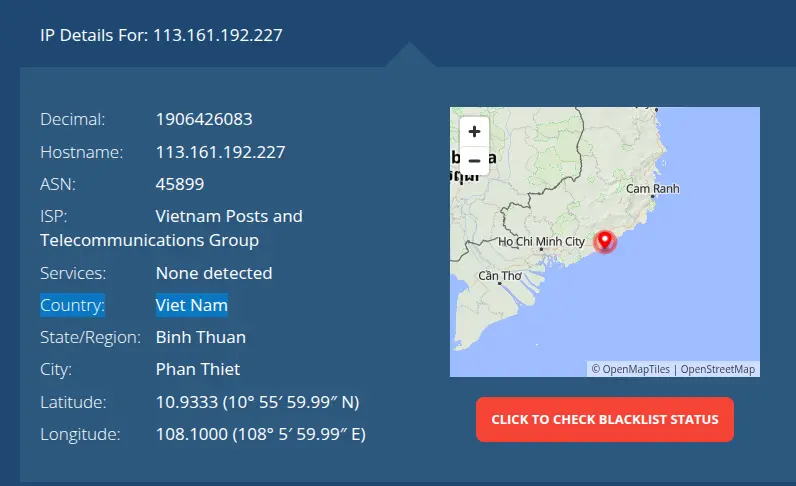
T-6. What country is this IP address associated with? (Format: Country)
Looking up the IP address, we can see that public IP is from ISP: Vietnam Posts and Telecommunications Group, located in Vietnam:
T-7. What is the range of source ports that were used by the attacker to make these login requests? (LowestPort-HighestPort - Ex: 100-541)
In the raw export of Windows Events Log txt file, we can see what source ports were associated with bruteforce attack:
> cat BTLO_Bruteforce_Challenge.txt | grep "Source Port:" | sort | (head -n 10; tail -n 10)
	Source Port:		-
	Source Port:		-
	Source Port:		-
	Source Port:		-
	Source Port:		49162
	Source Port:		49170
	Source Port:		49177
	Source Port:		49184
	Source Port:		49192
	Source Port:		49194
	Source Port:		65483
	Source Port:		65488
	Source Port:		65496
	Source Port:		65497
	Source Port:		65508
	Source Port:		65515
	Source Port:		65516
	Source Port:		65526
	Source Port:		65529
	Source Port:		65534
The ports shown in the raw txt file were in the random order. So, I used the command sort, then (head -n 10; tail -n 10) to see the first and last 10 lines of the source port to confirm the numbers.
4. MITRE tactics mapping
The timeline illustrates the attack progression from the attacker’s perspective. The attacker first targeted the exposed Remote Desktop Protocol (RDP) service and launched a brute-force attack by repeatedly attempting different password combinations, generating numerous failed logon events (Event ID 4625).
After successfully discovering valid credentials (MITRE ATT&CK: T1110 – Brute Force), the attacker authenticated using the compromised account (T1078 – Valid Accounts) and established an interactive RDP session (T1021.001 – Remote Services: RDP).
At this stage, the attacker had obtained remote access to the system and could proceed with post-compromise activities such as privilege escalation, lateral movement, or data access.
timeline
    title Brute Force Attack Timeline (MITRE ATT&CK)

    section Reconnaissance
        Target exposes Remote Desktop service (RDP)

    section Credential Access
        T1110 - Brute Force : Attacker repeatedly attempts password authentication
        Windows Event ID 4625 : Multiple failed logon events generated

    section Initial Access
        T1078 - Valid Accounts : Correct credentials successfully guessed
        Windows Event ID 4624 : Successful authentication recorded
        Logon Type 10 : Interactive Remote Desktop session established

    section Lateral / Post-Compromise
        T1021.001 - Remote Services (RDP) : Attacker gains remote access
        User session begins : Potential privilege escalation, persistence, or discovery
5. SOC workflow
From a defender’s perspective, the investigation begins by monitoring Windows Security logs for an unusually high number of failed logon events (Event ID 4625).
The analyst then correlates these events by source IP address, username, and timestamp to identify potential brute-force activity. If a successful logon event (Event ID 4624) is observed shortly after the failed attempts—particularly with Logon Type 10 (RDP session) the activity can be confirmed as a successful brute-force attack.
The incident is then escalated for containment by disabling or resetting the affected account, blocking the malicious source IP, and investigating the compromised host for any additional attacker activity.
flowchart TB

A["Windows Security Logs"] --> B["Monitor Event ID 4625 (Failed Logons)"]

B --> C{"Repeated failures<br/>from same IP?"}

C -- No --> D["Continue Monitoring"]

C -- Yes --> E["Identify Source IP<br/>Target Username"]

E --> F["Search for Event ID 4624"]

F --> G{"Successful login<br/>after failures?"}

G -- No --> H["Possible Failed Brute Force"]

G -- Yes --> I["Verify Logon Type = 10 (RDP)"]

I --> J["Correlate Username<br/>Source IP<br/>Timestamp"]

J --> K["Confirmed Brute Force"]

K --> L["Create Security Incident"]

L --> M["Contain Host"]

M --> N["Disable / Reset Account"]

N --> O["Block Source IP"]

O --> P["Review for Additional<br/>Post-Compromise Activity"]