Table of Contents
- Module 1 - Introduction to operating systems
- Module 2 - The Linux operating system
- Module 3 - Linux commands in the Bash shell
- Module 4 - Databases and SQL

Module 1 - Introduction to operating systems
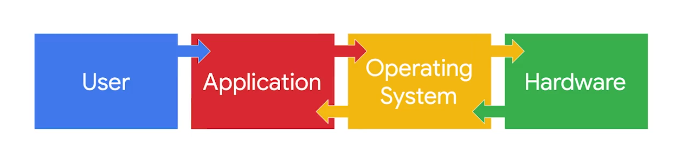
- User: The user initiates the process by having something they want to accomplish on the computer.
- Application: The application is the software program that users interact with to complete a task.
- Operating system: The operating system receives the user’s request from the application. It’s the operating system’s job to interpret the request and direct its flow.
- Hardware: The hardware is where all the processing is done to complete the tasks initiated by the user.
After the work is done by the hardware, it sends the output back through the operating system to the application so that it can display the results to the user.
Module 2 - The Linux operating system
Linux distribution
Parent Distributions
- Red Hat Enterprise Linux (CentOS)
- Slackware (SUSE)
- Debian (Ubuntu and KALI LINUX)
KALI LINUX ™
Pentesting tools
- Metasploit
- Burp Suite
- John the Ripper
Digital forensics: The practice of collecting and analyzing data to determine what has happened after an attack.
Digital forensics tools
- tcpdump
- Wireshark
- Autopsy
Package managers
Advanced Package Tool (APT)
APT is a tool used with Debian-derived distributions. It is run from the command-line interface to manage, search, and install packages.
Yellowdog Updater Modified (YUM)
YUM is a tool used with Red Hat-derived distributions. It is run from the command-line interface to manage, search, and install packages. YUM works with .rpm files.
Module 3 - Linux commands in the Bash shell
Linux commands via the Bash shell
Security analysts
- work with server logs
- navigate, manage and analyze files remotely
- verify and configure users and group access
- give authorization and set file permissions
Navigate Linux and read file content
Filesystem Hierarchy Standard (FHS)
The component of Linux that organizes data. It defines how directories, directory contents, and other storage is organized in the operating system.
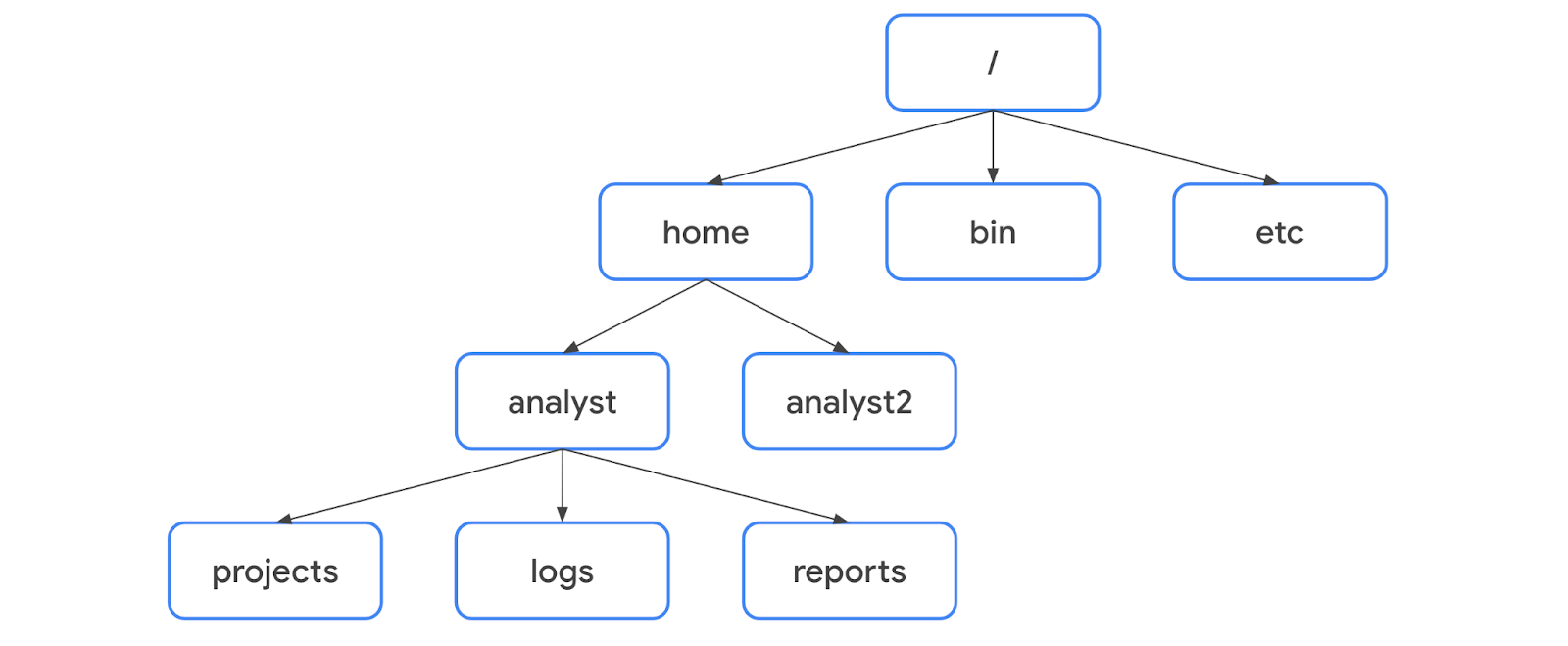
Standard FHS directories
/home: Each user in the gets their own home directory./bin: Contains binary files and other executables. Executables are files that contain a series of commands a computer needs to follow to run programs and perform other functions./etc: This directory stores the system’s configuration files./tmp: This directory stores many temporary files. The/tmpdirectory is commonly used by attackers because anyone in the system can modify data in these files./mnt: This directory stands for “mount” and stores media, such as USB drives and hard drives.
-name and -iname
find /home/analyst/projects -name "*log*"- Case-sensitive strings searchingfind /home/analyst/projects -iname "*log*"- Not case-sensitive strings searching
User & Group Management
User Management centers on the useradd, usermod, and userdel commands to create, modify, and remove accounts.
useradd -m usernameto create a user with a home directoryusermod -aG groupname usernameto add them to supplementary groupsuserdel -r usernameto delete the account and its files.
Group Management utilizes groupadd, groupmod, groupdel, and chgrp to organize permissions.
- Create groups with
groupaddgroupname - Modify group details with
groupmod - Delete empty groups with
groupdel - Assign group ownership to files using
chgrp groupname filename
Module 4 - Databases and SQL
WHERE
To create a filter in SQL, you need to use the keyword WHERE. WHERE indicates the condition for a filter.
SELECT firstname, lastname, title, email
FROM employees
WHERE title = 'IT Staff';| Pattern | Results that could be returned |
|---|---|
'a%' | apple123, art, a |
'a_' | as, an, a7 |
'a__' | ant, add, a1c |
'%a' | pizza, Z6ra, a |
'_a' | ma, 1a, Ha |
'%a%' | Again, back, a |
'_a_' | Car, ban, ea7 |
LIKE
To apply wildcards to the filter, you need to use the LIKE operator instead of an equals sign (=). LIKE is used with WHERE to search for a pattern in a column.
SELECT lastname, firstname, title, email
FROM employees
WHERE title LIKE 'IT%';
BETWEEN
Filter for login attempts made in a certain date range:
SELECT *
FROM log_in_attempts
WHERE login_date BETWEEN '2023-02-01' AND '2023-02-07';
AND
As an example, a cybersecurity concern might affect only those customer accounts that meet both the condition of being handled by a support representative with an ID of 5 and the condition of being located in the USA. To find the names and emails of those specific customers, you should place the two conditions on either side of the AND operator in the WHERE clause:
SELECT firstname, lastname, email, country, supportrepid
FROM customers
WHERE supportrepid = 5 AND country = 'USA';
OR
For example, if you are responsible for finding all customers who are either in the USA or Canada so that you can communicate information about a security update, you can use an OR operator to find all the needed records. As the following query demonstrates, you should place the two conditions on either side of the OR operator in the WHERE clause:
SELECT firstname, lastname, email, country
FROM customers
WHERE country = 'Canada' OR country = 'USA';
NOT
For example, if a cybersecurity issue doesn’t affect customers in the USA but might affect those in other countries, you can return all customers who are not in the USA. This would be more efficient than creating individual conditions for all of the other countries. To use the NOT operator for this task, write the following query and place NOT directly after WHERE:
SELECT firstname, lastname, email, country
FROM customers
WHERE NOT country = 'USA';
Combining logical operators
SELECT firstname, lastname, email, country
FROM customers
WHERE NOT country = 'Canada' AND NOT country = 'USA';
Join tables in SQL
- INNER JOIN: Returns rows matching on a specified column that exists in more than one table.
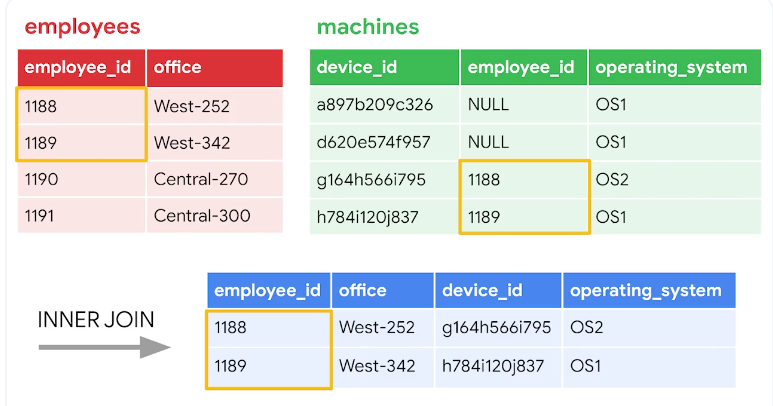
The first type of join that you might perform is an inner join. INNER JOIN returns rows matching on a specified column that exists in more than one table.
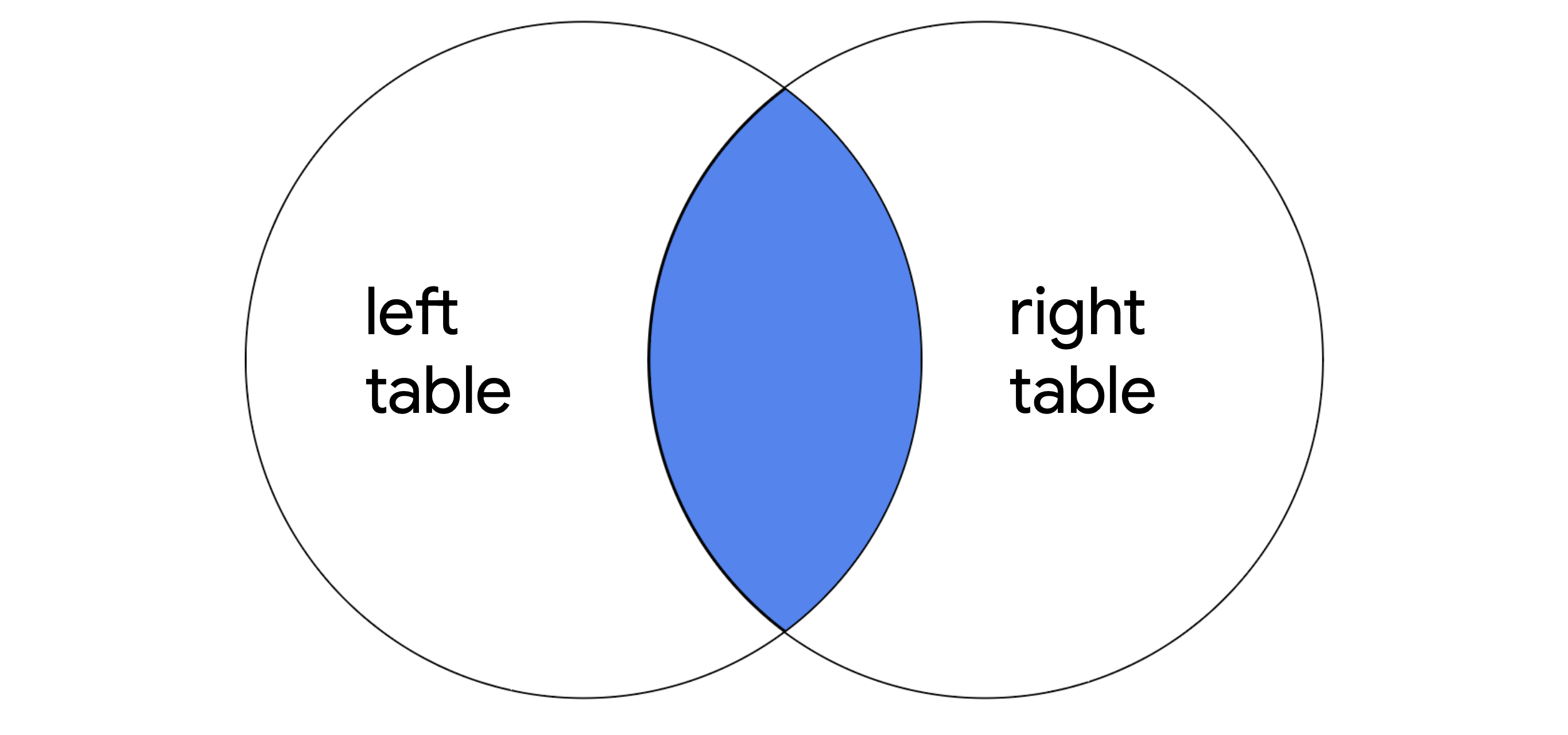
SELECT *
FROM employees
INNER JOIN machines ON employees.device_id = machines.device_id;
OUTER JOIN
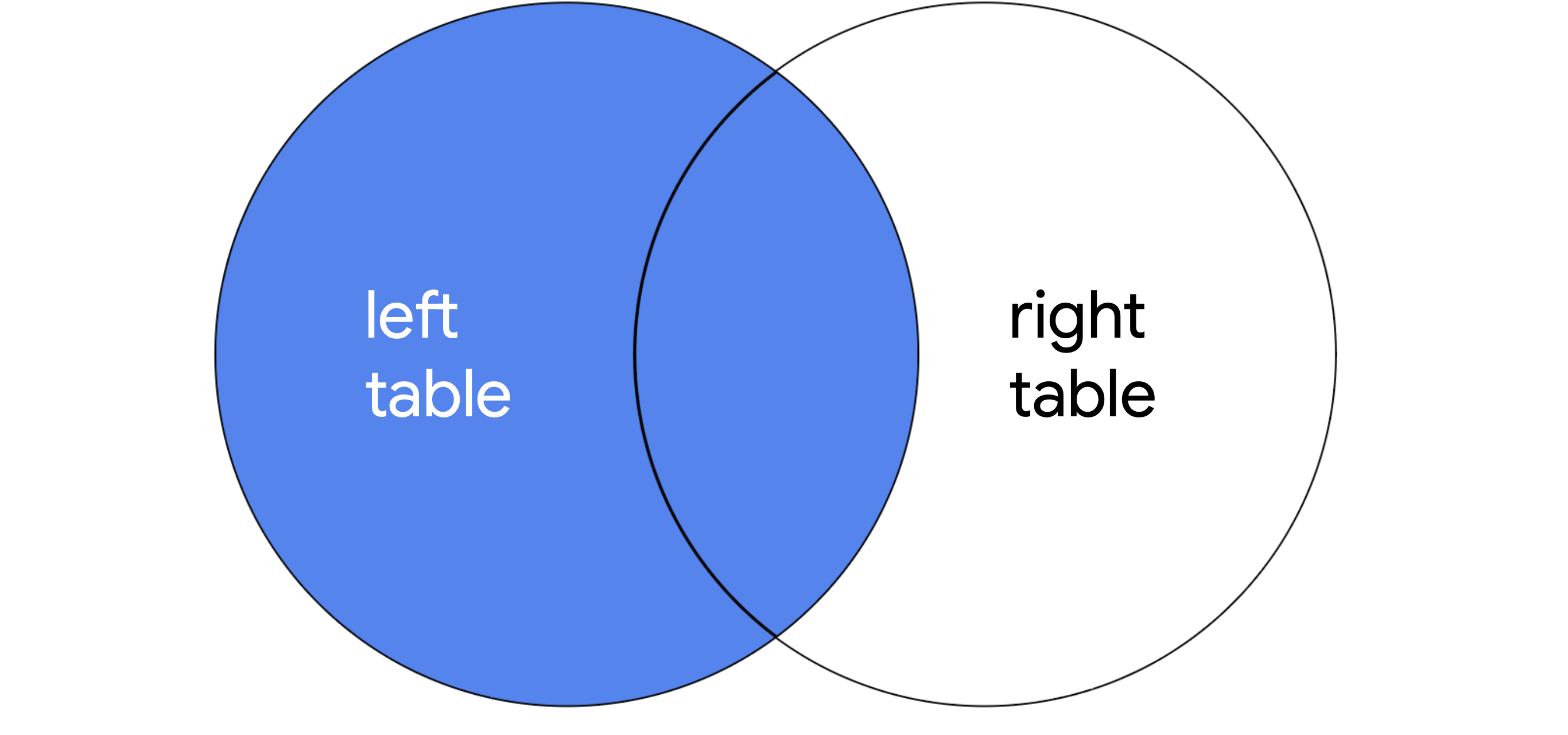
- LEFT JOIN: Returns all of the records of the first table, but only returns rows of the second table that match on a specified column.
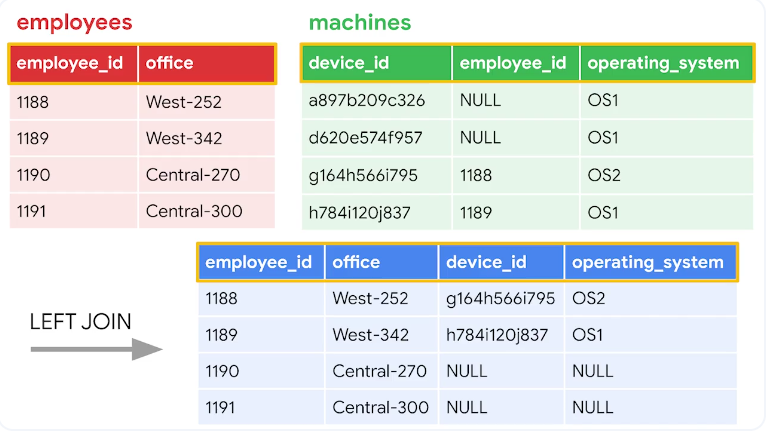
When joining two tables, LEFT JOIN returns all the records of the first table, but only returns rows of the second table that match on a specified column.
SELECT *

FROM employees

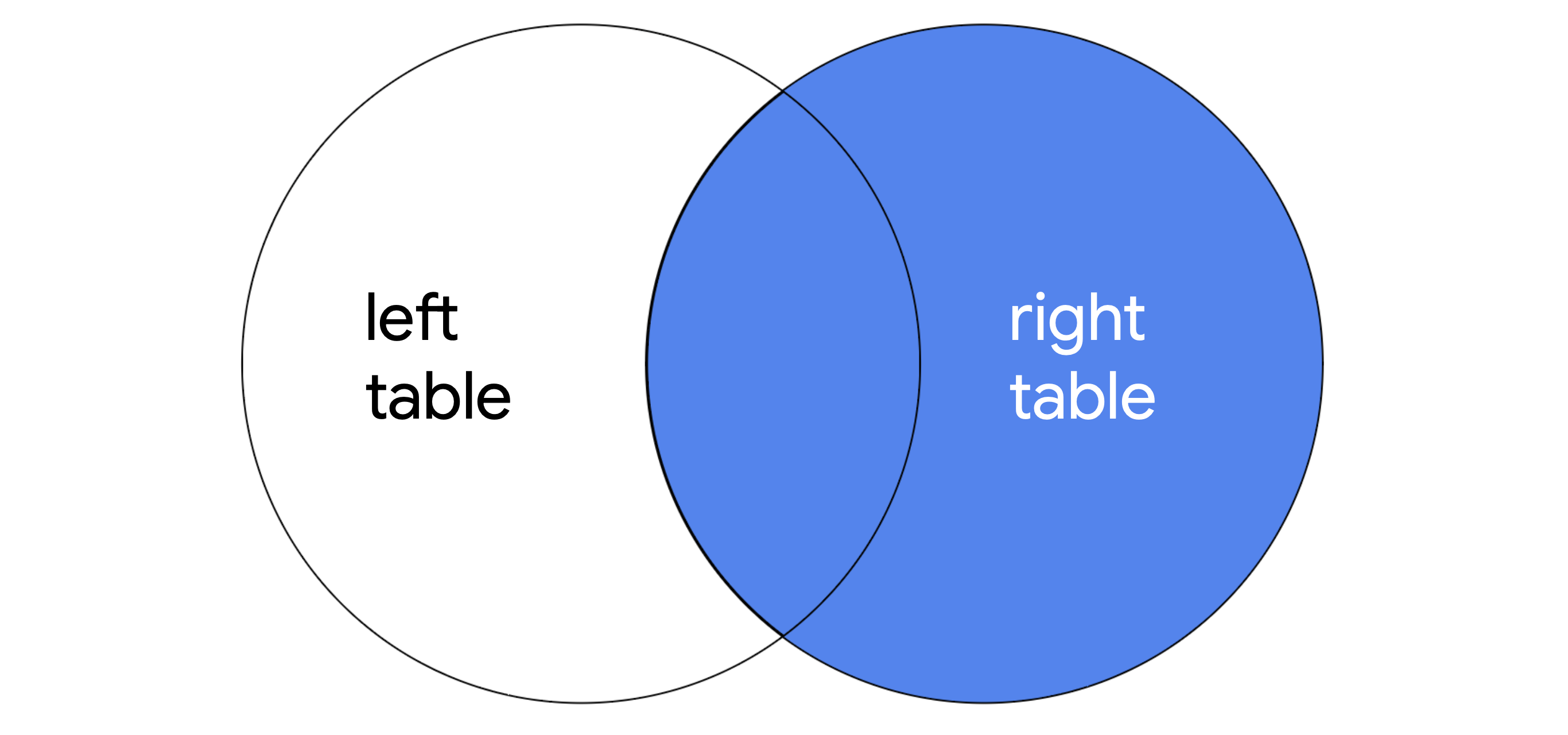
LEFT JOIN machines ON employees.device_id = machines.device_id;- RIGHT JOIN: Returns all of the records of the second table, but only returns rows from the first table that match on a specified column.
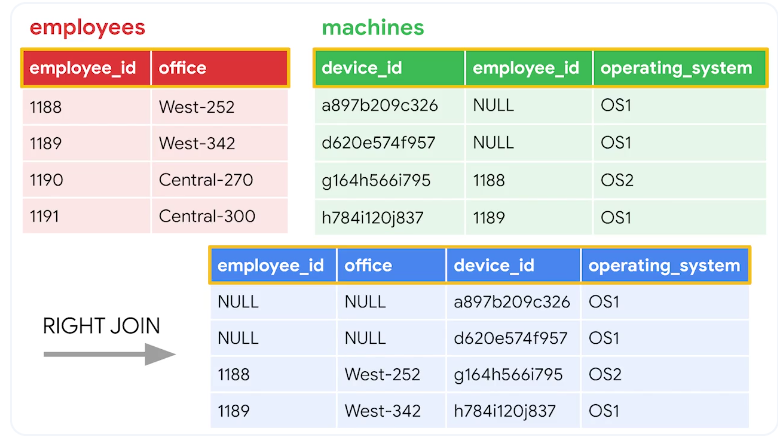
When joining two tables, RIGHT JOIN returns all of the records of the second table, but only returns rows from the first table that match on a specified column.
SELECT *
FROM employees
RIGHT JOIN machines ON employees.device_id = machines.device_id;- Full outer joins:
FULL OUTER JOINreturns all records from both tables. You can think of it as a way of completely merging two tables.
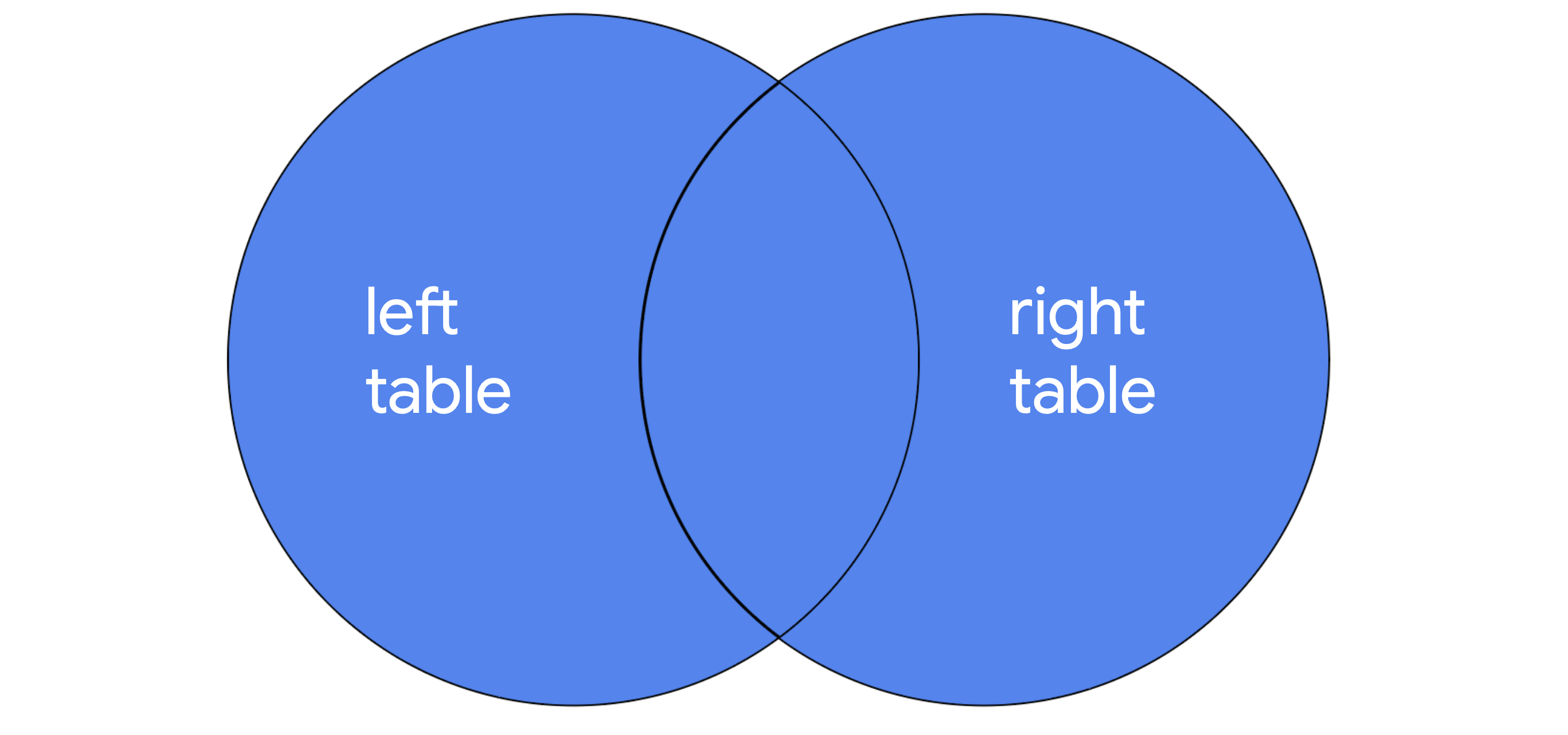
SELECT *
FROM employees
FULL OUTER JOIN machines ON employees.device_id = machines.device_id;
Aggregate functions
In SQL, aggregate functions are functions that perform a calculation over multiple data points and return the result of the calculation. The actual data is not returned.
- COUNT returns a single number that represents the number of rows returned from your query.
- AVG returns a single number that represents the average of the numerical data in a column.
- SUM returns a single number that represents the sum of the numerical data in a column.
SELECT COUNT(firstname)
FROM customers;