
Module 1 - Introduction to asset security
The what, why, and how of asset security
- Risk: Anything that can impact the confidentiality, integrity, or availability of an asset.
Likelihood x Impact = Risk - Threat: Any circumstance or event that can negatively impact assets
- Vulnerability: A weakness that can be exploited by a threat
Security starts with asset classification
Asset management: The process of tracking assets and the risks that affect them.
- Starts with Asset inventory: A catalog of assets that need to be protected.
Asset classification: The practice of labeling assets based on sensitivity and importance to an organization.
- Public
- Internal-only
- Confidential
- Restricted
Elements of a Security Plan
- Policies: These are foundational rules that reduce risk and protect information, outlining the scope, objectives, and limitations of a security plan.
- Standards: These provide tactical guidance, acting as references that inform how policies are set, such as specifying password length requirements.
- Procedures: These are step-by-step instructions for performing specific security tasks, promoting accountability, consistency, and efficiency within an organization.
Module 2 - Protect organizational assets
Security controls
- Operational
- Technical
- Managerial
Usage audits: Reviewing which resources each account is accessing and what the user is doing with the resource.
Privilege audits: Whether a user’s role is in alignment with the resources they have access to.
Account change audits: Account directory services keep records and logs associated with each user.
The data lifecycle
- PII: Personally identifiable information, any information used to infer an individual’s identity.
- PHI: Protected health information, information that relates to the past, present, or future physical or mental health or condition of an individual.
- SPII: S for sensitive, a specific type of PII that falls under stricter handling guidelines.
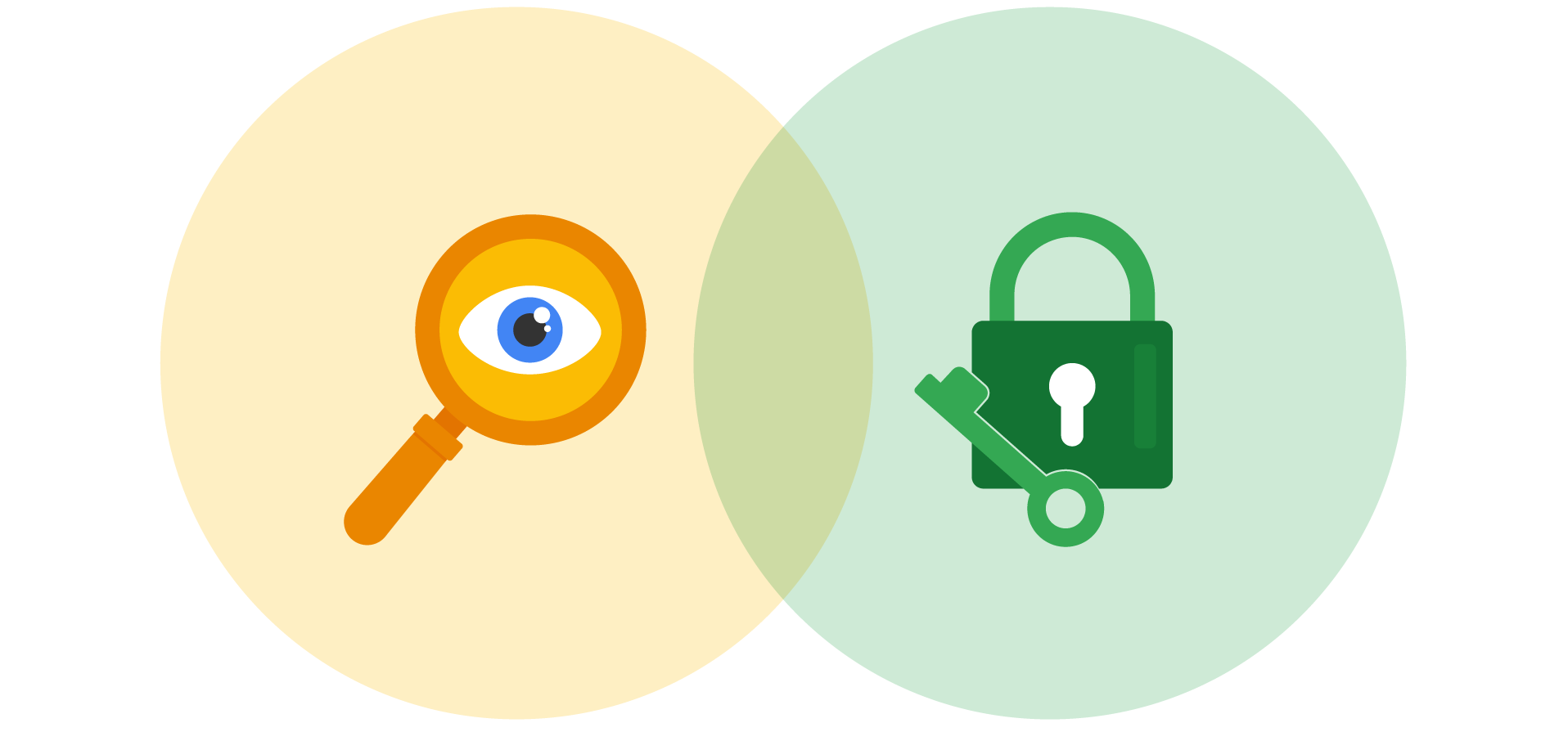
- Information privacy refers to the protection from unauthorized access and distribution of data.
- Information security (InfoSec) refers to the practice of keeping data in all states away from unauthorized users.
Fundamentals cryptography
Cipher: An algorithm that encrypts information.
Public key infrastructure (PKI)
An encryption framework that secures the exchange of information online.
- Symmetric encryption is the use of a single secret key to exchange information. Because it uses one key for encryption and decryption, the sender and receiver must know the secret key to lock or unlock the cipher.
- Asymmetric encryption is the use of a public and private key pair for encryption and decryption of data. It uses two separate keys: a public key and a private key. The public key is used to encrypt data, and the private key decrypts it. The private key is only given to users with authorized access.
Non-repudiation and hashing
Non-repudiation: The concept that the authenticity of information can’t be denied.
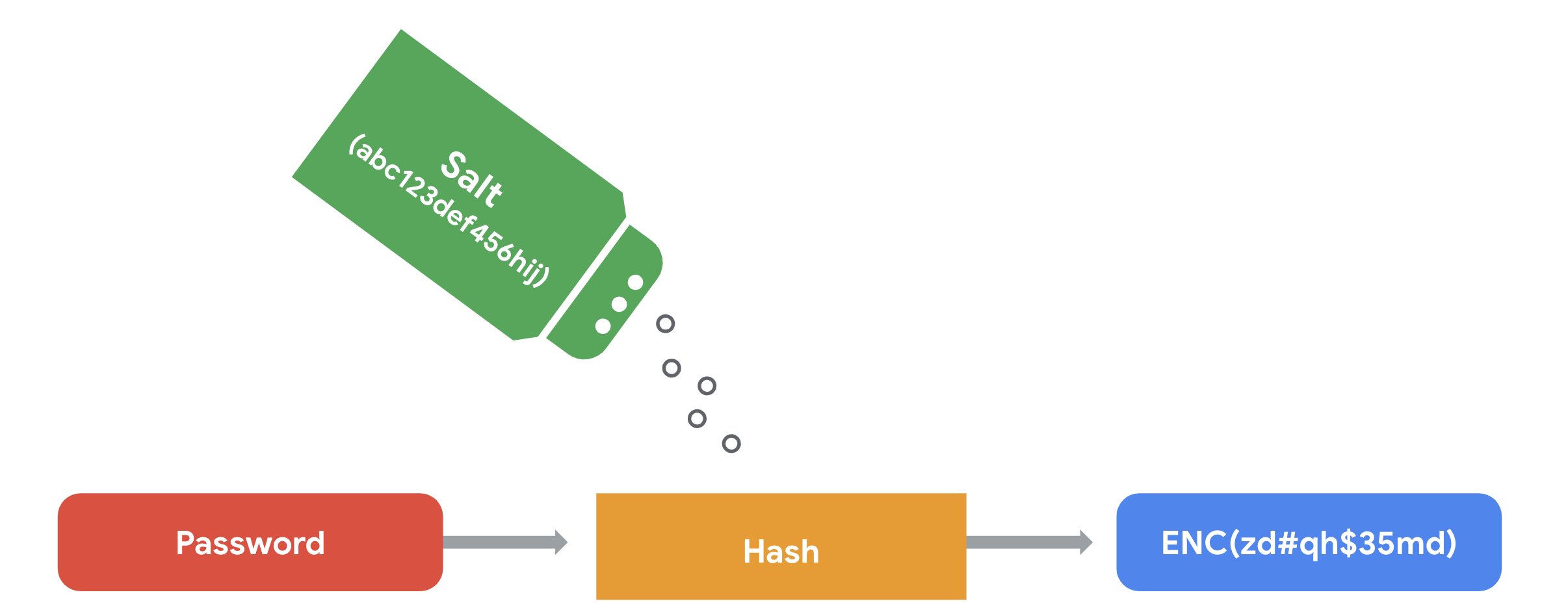
Hashing: The hash function is an algorithm that produces a code that can’t be decrypted (digesting).
# Checking the hash of a particular file
$ sha256 <filename>
Salting is an additional safeguard that’s used to strengthen hash functions. A salt is a random string of characters that’s added to data before it’s hashed. The additional characters produce a more unique hash value, making salted data resilient to rainbow table attacks.
Access controls and authentication systems
Authentication:
- Knowledge: something the user knows
- Ownership: something the user possesses
- Characteristic: something the user is
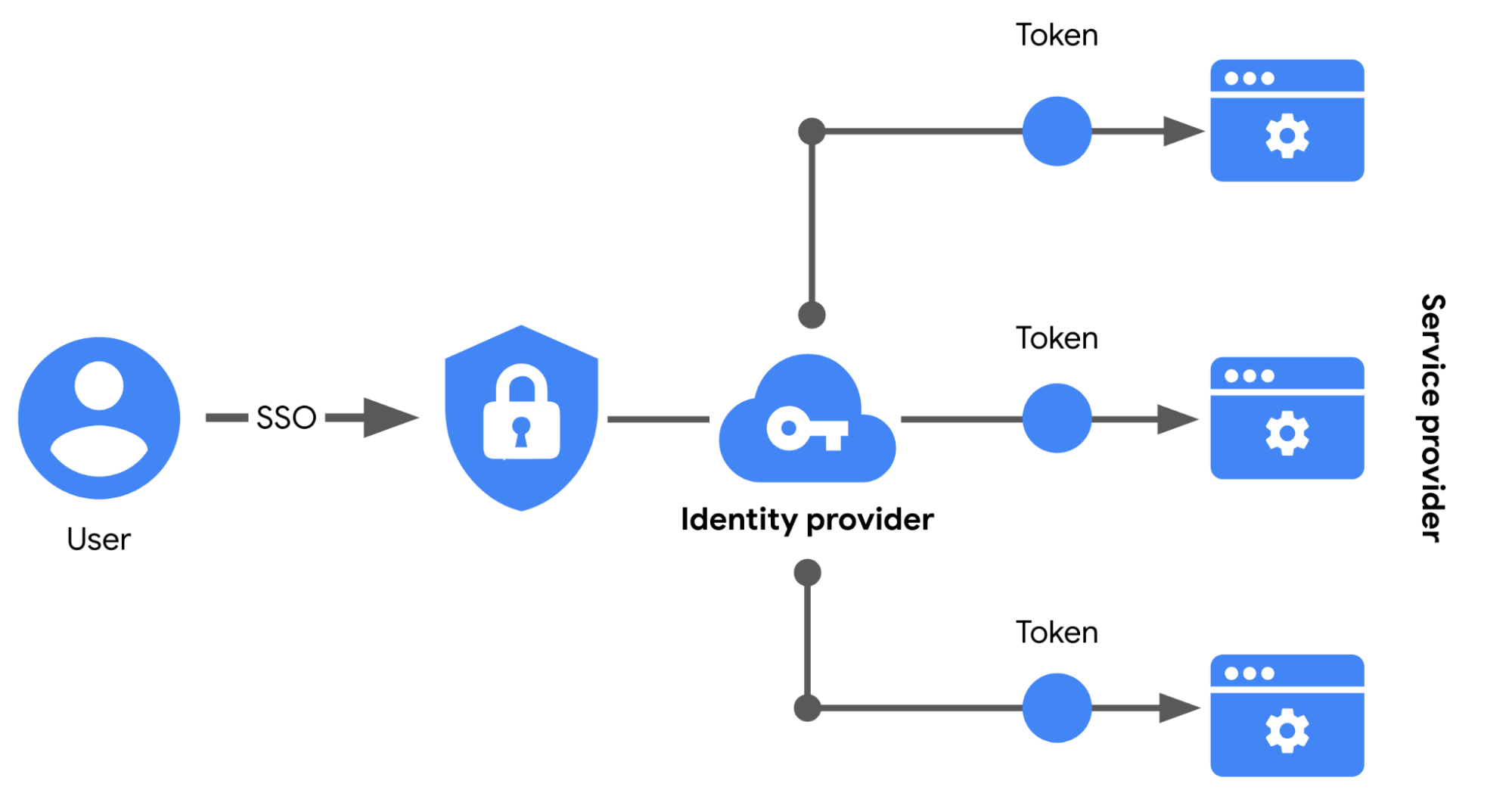
Single sign-on (SSO): A technology that combines several different logins into one.
SSO works by automating how trust is established between a user and a service provider. Rather than placing the responsibility on an employee or customer, SSO solutions use trusted third-parties to prove that a user is who they claim to be. This is done through the exchange of encrypted access tokens between the identity provider and the service provider.
Why we audit user activity
Session: A sequence of network HTTP basic auth requests and responses associated with the same user.
Session ID: A unique token that identifies a user and their device while accessing the system.
Session cookie: A token that websites use to validate a session and determine how long that session should last.
Authentication, Authorization, Accounting (AAA) Framework
- Authentication: verifies the identity of a user or device attempting to access the network (adccffa6;">passwords, biometrics, MFA, etc).
- Authorization: determines what resources and actions the authenticated user is permitted to access (policies: adccffa6;">Role-Based Access Control (RBAC) or the principle of least privilege).
- Accounting (Auditing): tracks and logs user activities, including adccffa6;">login times, data usage, and session details, to provide an audit trail for troubleshooting, billing, and forensic investigation.
Identity and access management (IAM) is a collection of processes and technologies that helps organizations manage digital identities in their environment. Both AAA and IAM systems are designed to authenticate users, determine their access privileges, and track their activities within a system.
User provisioning is the process of creating and maintaining a user’s digital identity.
Granting authorization
- Mandatory access control (MAC)
- Discretionary access control (DAC)
- Role-based access control (RBAC)
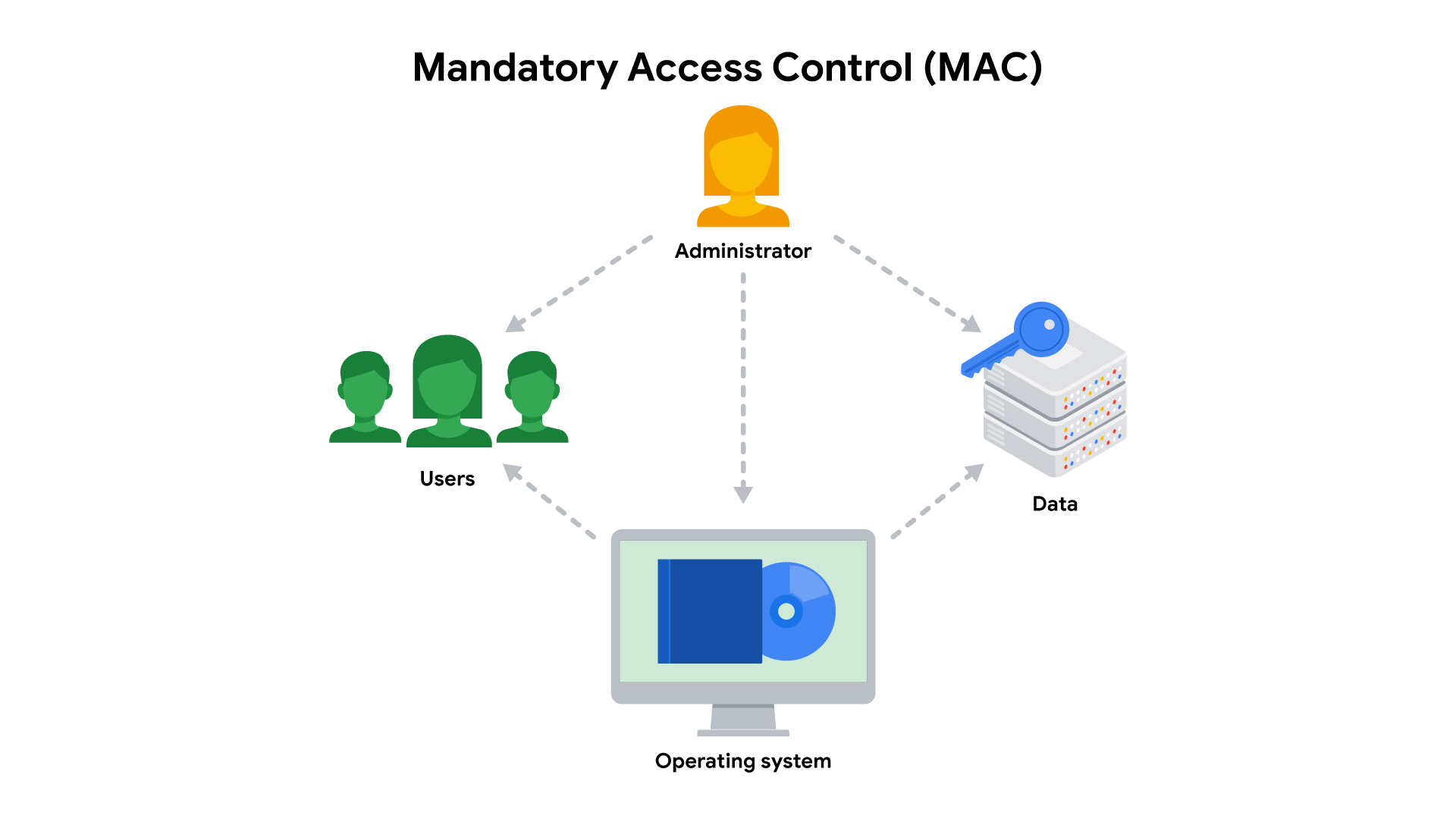
MAC is the strictest of the three frameworks. Authorization in this model is based on a strict need-to-know basis. Access to information must be granted manually by a central authority or system administrator.
- Commonly applied in law enforcement, military, and other government agencies where users must request access through a chain of command. MAC is also known as non-discretionary control because access isn’t given at the discretion of the data owner.
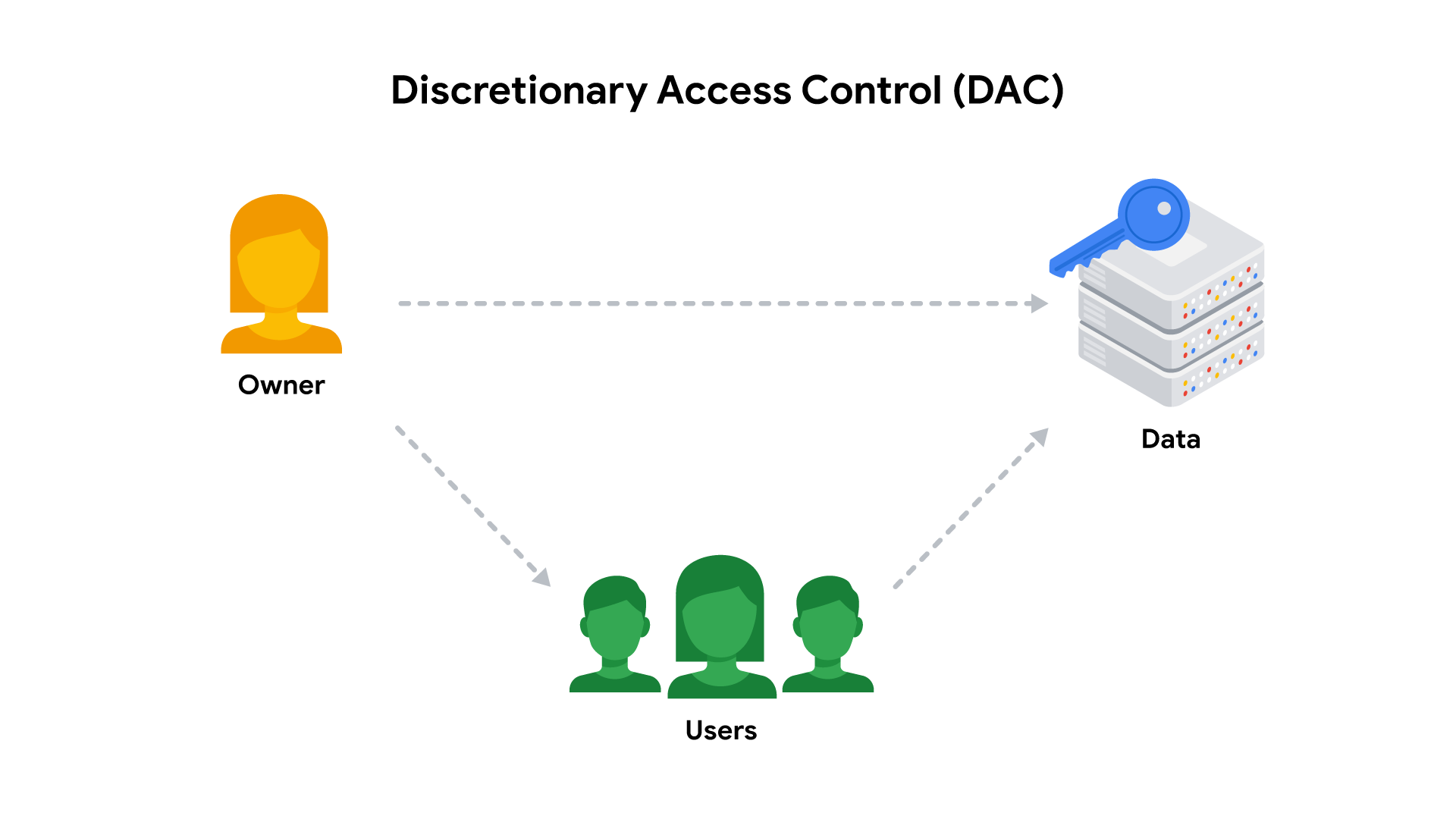
DAC is typically applied when a data owner decides appropriate levels of access.
- One example of DAC is when the owner of a Google Drive folder shares editor, viewer, or commentor access with someone else.
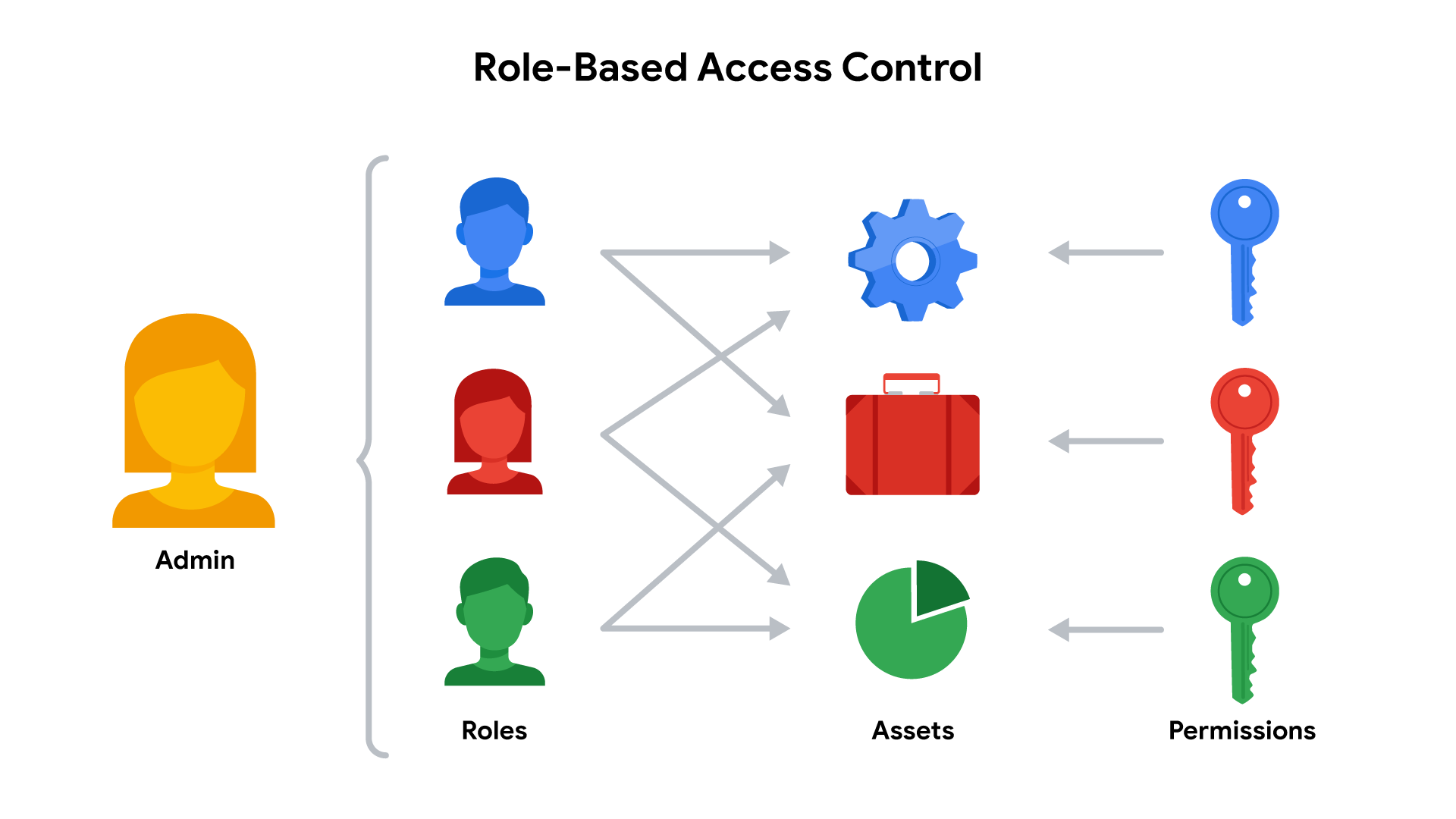
RBAC is used when authorization is determined by a user’s role within an organization.
- For example, a user in the marketing department may have access to user analytics but not network administration.
Module 3 - Vulnerabilities in systems
Vulnerability management
- Identify vulnerabilities
- Consider potential exploits
- Prepare defense against threats
Zero-day: An exploit that was previously unknown.
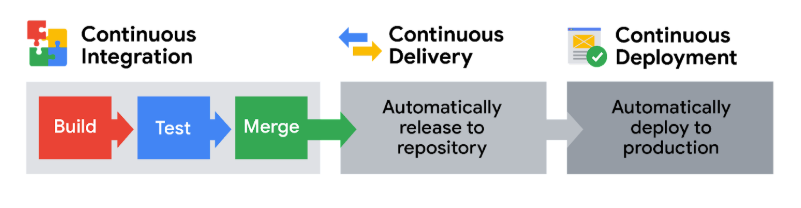
Vulnerabilities of CI/CD
Continuous Integration (Building a solid foundation) is all about frequently merging code changes from different developers into a central location. This triggers automated processes like building the software and running tests. CI catches problems through an automated process: every time code is integrated, the system automatically builds and tests it. This immediate feedback loop reveals integration problems as soon as they occur. CI helps catch integration problems early, leading to higher quality code. Think of it as the foundation of the pipeline.
Continuous Delivery (Ready to release) means your code is always ready to be released to users. After passing automated tests, code is automatically deployed to a staging environment (a practice environment) or prepared for final release. Typically, a manual approval step is still needed before going live to production, which provides a control point.
Continuous Deployment (Fully automated releases) automates the entire release process. Changes that pass all automated checks are automatically deployed directly to the live production environment, with no manual approval. This is all about speed and efficiency.
Defense in depth strategy
- Perimeter layer, like authentication systems that validate user access
- Network layer, which is made up of technologies like network firewalls and others
- Endpoint layer, which describes devices on a network, like laptops, desktops, or servers
- Application layer, which involves the software that users interact with
- Data layer, which includes any information that’s stored, in transit, or in use
Common vulnerabilities and exposures
- Common Vulnerabilities and Exposures list (CVE list): An openly accessible dictionary of known vulnerabilities and exposures.
- CVE list criteria
- Independent of other issues
- Recognized as a potential security risk
- Submitted with supporting evidence
- Only affect one codebase
- CVE Numbering Authority (CNA): An organization that volunteers to analyze and distribute information on eligible CVEs.
- Common Vulnerability Scoring System (CVSS): A measurement system that scores the severity of a vulnerability.
MITRE: A collection of non-profit research and development centers.
The OWASP Top 10
Open Worldwide Application Security Project that security professionals from around the world use to share information, tools, and events that are focused on securing the web.
1. Broken access control
Access controls limit what users can do in a web application. For example, a blog might allow visitors to post comments on a recent article but restricts them from deleting the article entirely.
2. Cryptographic failures
Information is one of the most important assets businesses need to protect. Privacy laws such as General Data Protection Regulation (GDPR) require sensitive data to be protected by effective encryption methods.
3. Injection
Injection occurs when malicious code is inserted into a vulnerable application. Although the app appears to work normally, it does things that it wasn’t intended to do. Injection attacks can give threat actors a backdoor into an organization’s information system (target: login forms).
4. Insecure design
Applications should be designed in such a way that makes them resilient to attack. Insecure design refers to a wide range of missing or poorly implemented security controls that should have been programmed into an application when it was being developed.
5. Security misconfiguration
Misconfigurations occur when security settings aren’t properly set or maintained. A common example is when businesses deploy equipment, like a network server, using default settings.
6. Vulnerable and outdated components
Vulnerable and outdated components is a category that mainly relates to application development. Applications that use vulnerable components that have not been maintained are at greater risk of being exploited by threat actors.
7. Identification and authentication failures
When applications fail to recognize who should have access and what they’re authorized to do, it can lead to serious problems. For example, a home Wi-Fi router normally uses a simple login form to keep unwanted guests off the network.
8. Software and data integrity failures
Software and data integrity failures are instances when updates or patches are inadequately reviewed before implementation. A famous example of a supply chain attack is the SolarWinds cyber attack (2020) where hackers injected malicious code into software updates that the company unknowingly released to their customers.
9. Security logging and monitoring failures
Having a record of events like user login attempts is critical to finding and fixing problems. Sufficient monitoring and incident response is equally important.
10. Server-side request forgery
Companies have public and private information stored on web servers. When you use a hyperlink or click a button on a website, a request is sent to a server that should validate who you are, fetch the appropriate data, and then return it to you.
OSINT Tools
- VirusTotal is a service that allows anyone to analyze suspicious files, domains, URLs, and IP addresses for malicious content.
- MITRE ATT&CK® is a knowledge base of adversary tactics and techniques based on real-world observations.
- OSINT Framework is a web-based interface where you can find OSINT tools for almost any kind of source or platform.
- Have I been Pwned is a tool that can be used to search for breached email accounts.
Vulnerability assessment process
- Identification
- Vulnerability analysis
- Risk assessment
- Remediation
Penetration testing strategies
- Open-box testing is when the tester has the same privileged access that an internal developer would have—information like system architecture, data flow, and network diagrams. This strategy goes by several different names, including internal, full knowledge, white-box, and clear-box penetration testing.
- Closed-box testing is when the tester has little to no access to internal systems—similar to a malicious hacker. This strategy is sometimes referred to as external, black-box, or zero knowledge penetration testing.
- Partial knowledge testing is when the tester has limited access and knowledge of an internal system—for example, a customer service representative. This strategy is also known as gray-box testing.