HTB Lab: https://app.hackthebox.com/sherlocks/Brutus?tab=play_sherlock
Sherlock Scenario
In this Sherlock, you will familiarize yourself with Unix auth.log and wtmp logs. We’ll explore a scenario where a Confluence server was brute-forced via its SSH service. After gaining access to the server, the attacker performed additional activities, which we can track using auth.log. Although auth.log is primarily used for brute-force analysis, we will delve into the full potential of this artifact in our investigation, including aspects of privilege escalation, persistence, and even some visibility into command execution.
Tools Used
- utmpdump (util-linux) to convert binary accounting logs into ASCII text.
- MITRE ATT&CK framework to identify attack techniques.
Q&A
T-1. Analyze the auth.log. What is the IP address used by the attacker to carry out a brute force attack?
In the scenario files, auth.log is the text file that dynamically records authentication events on Linux systems. I opened a text editor and started looking for the brute force attack patterns:
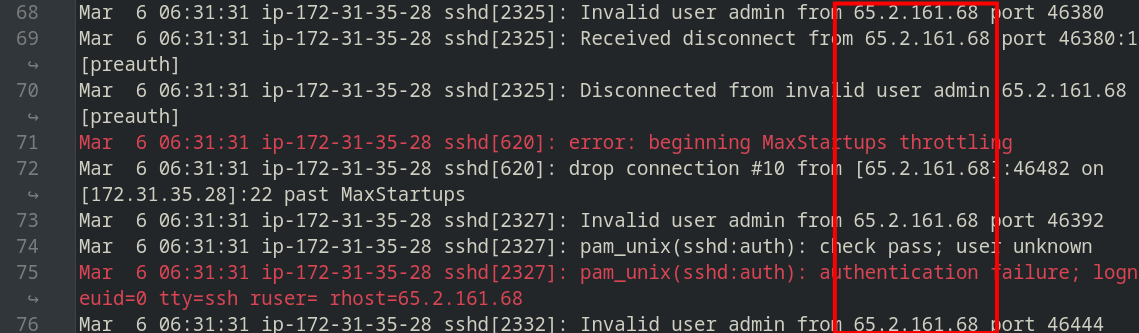
Starting from the line 68 to 321, we can see that an IP address was entering passwords until it succeeded and those SSH sessions were closed after failing three times for each.
T-2. The bruteforce attempts were successful and attacker gained access to an account on the server. What is the username of the account?
Throughout the analysis, we can see that the attacker was able to logged in as root at line 322:

T-3. Identify the UTC timestamp when the attacker logged in manually to the server and established a terminal session to carry out their objectives. The login time will be different than the authentication time, and can be found in the wtmp artifact.
For those who aren’t familiar with logs, utmp stores current active login states and wtmp store historical record of all logins/logouts. These are both binary files tracking terminal sessions rather than raw authentication data like auth.log.
In the terminal, I convert wtmp file into readable format using utmpdump:
$ utmpdump wtmp
[2] [00000] [~~  ] [reboot  ] [~           ] [6.2.0-1017-aws      ] [0.0.0.0        ] [2024-01-25T11:12:17,804944+00:00]
[5] [00601] [tyS0] [        ] [ttyS0       ] [                    ] [0.0.0.0        ] [2024-01-25T11:12:31,072401+00:00]
[6] [00601] [tyS0] [LOGIN   ] [ttyS0       ] [                    ] [0.0.0.0        ] [2024-01-25T11:12:31,072401+00:00]
[5] [00618] [tty1] [        ] [tty1        ] [                    ] [0.0.0.0        ] [2024-01-25T11:12:31,080342+00:00]
[6] [00618] [tty1] [LOGIN   ] [tty1        ] [                    ] [0.0.0.0        ] [2024-01-25T11:12:31,080342+00:00]
[1] [00053] [~~  ] [runlevel] [~           ] [6.2.0-1017-aws      ] [0.0.0.0        ] [2024-01-25T11:12:33,792454+00:00]
[7] [01284] [ts/0] [ubuntu  ] [pts/0       ] [203.101.190.9       ] [203.101.190.9  ] [2024-01-25T11:13:58,354674+00:00]
[8] [01284] [    ] [        ] [pts/0       ] [                    ] [0.0.0.0        ] [2024-01-25T11:15:12,956114+00:00]
[7] [01483] [ts/0] [root    ] [pts/0       ] [203.101.190.9       ] [203.101.190.9  ] [2024-01-25T11:15:40,806926+00:00]
[8] [01404] [    ] [        ] [pts/0       ] [                    ] [0.0.0.0        ] [2024-01-25T12:34:34,949753+00:00]
[7] [836798] [ts/0] [root    ] [pts/0       ] [203.101.190.9       ] [203.101.190.9  ] [2024-02-11T10:33:49,408334+00:00]
[5] [838568] [tyS0] [        ] [ttyS0       ] [                    ] [0.0.0.0        ] [2024-02-11T10:39:02,172417+00:00]
[6] [838568] [tyS0] [LOGIN   ] [ttyS0       ] [                    ] [0.0.0.0        ] [2024-02-11T10:39:02,172417+00:00]
[7] [838962] [ts/1] [root    ] [pts/1       ] [203.101.190.9       ] [203.101.190.9  ] [2024-02-11T10:41:11,700107+00:00]
[8] [838896] [    ] [        ] [pts/1       ] [                    ] [0.0.0.0        ] [2024-02-11T10:41:46,272984+00:00]
[7] [842171] [ts/1] [root    ] [pts/1       ] [203.101.190.9       ] [203.101.190.9  ] [2024-02-11T10:54:27,775434+00:00]
[8] [842073] [    ] [        ] [pts/1       ] [                    ] [0.0.0.0        ] [2024-02-11T11:08:04,769514+00:00]
[8] [836694] [    ] [        ] [pts/0       ] [                    ] [0.0.0.0        ] [2024-02-11T11:08:04,769963+00:00]
[1] [00000] [~~  ] [shutdown] [~           ] [6.2.0-1017-aws      ] [0.0.0.0        ] [2024-02-11T11:09:18,000731+00:00]
[2] [00000] [~~  ] [reboot  ] [~           ] [6.2.0-1018-aws      ] [0.0.0.0        ] [2024-03-06T06:17:15,744575+00:00]
[5] [00464] [tyS0] [        ] [ttyS0       ] [                    ] [0.0.0.0        ] [2024-03-06T06:17:27,354378+00:00]
[6] [00464] [tyS0] [LOGIN   ] [ttyS0       ] [                    ] [0.0.0.0        ] [2024-03-06T06:17:27,354378+00:00]
[5] [00505] [tty1] [        ] [tty1        ] [                    ] [0.0.0.0        ] [2024-03-06T06:17:27,469940+00:00]
[6] [00505] [tty1] [LOGIN   ] [tty1        ] [                    ] [0.0.0.0        ] [2024-03-06T06:17:27,469940+00:00]
[1] [00053] [~~  ] [runlevel] [~           ] [6.2.0-1018-aws      ] [0.0.0.0        ] [2024-03-06T06:17:29,538024+00:00]
[7] [01583] [ts/0] [root    ] [pts/0       ] [203.101.190.9       ] [203.101.190.9  ] [2024-03-06T06:19:55,151913+00:00]
[7] [02549] [ts/1] [root    ] [pts/1       ] [65.2.161.68         ] [65.2.161.68    ] [2024-03-06T06:32:45,387923+00:00]
[8] [02491] [    ] [        ] [pts/1       ] [                    ] [0.0.0.0        ] [2024-03-06T06:37:24,590579+00:00]
[7] [02667] [ts/1] [cyberjunkie] [pts/1       ] [65.2.161.68         ] [65.2.161.68    ] [2024-03-06T06:37:35,475575+00:00]
If you look closely in IP addresses, there’s the attacker IP present (from T-1) logged in as root, at ID 02549 and time 2024-03-06 06:32:45. That was also the same event we saw in auth.log.
T-4. SSH login sessions are tracked and assigned a session number upon login. What is the session number assigned to the attacker’s session for the user account from Question 2?
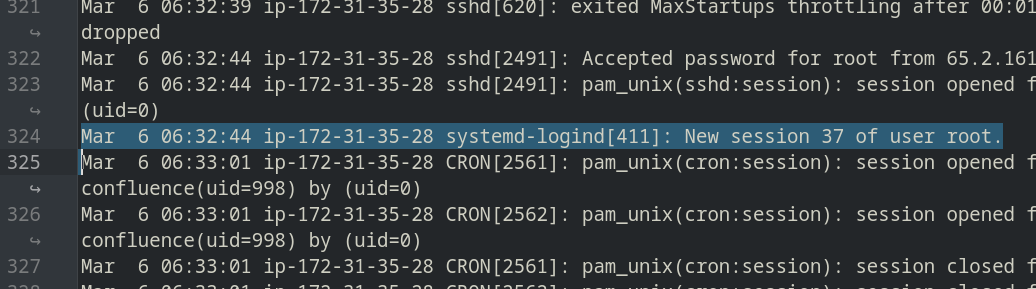
If we continue analyzing the logs afterward T-2, there was a new session opened when the attacker was able to logged in as root:
T-5. The attacker added a new user as part of their persistence strategy on the server and gave this new user account higher privileges. What is the name of this account?
Starting from line 333, we can notice that the attacker created a new user account after gaining root privileges:

T-6. What is the MITRE ATT&CK sub-technique ID used for persistence by creating a new account?
I went to MITRE ATT&CK framework and looked up for anything related to this specific activity within Persistent techniques:
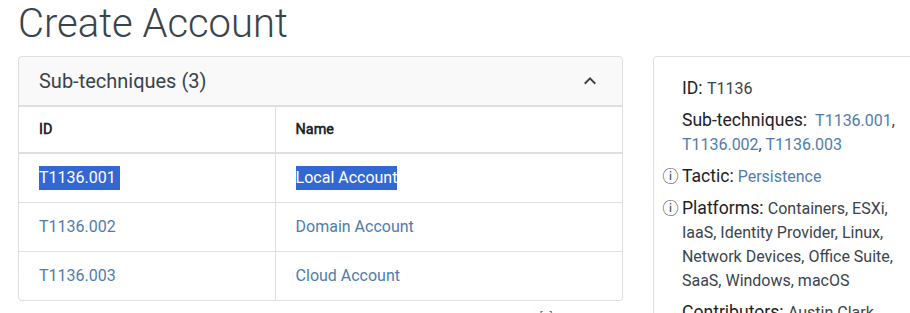
According to logs, the attacker created a new account as local on the server, and this specifies that sub-technique ID.
T-7. What time did the attacker’s first SSH session end according to auth.log?
In auth.log line 355, we can see that the attacker logged out from root session after creating a new persistent account (cyberjunk), then switched to it:

T-8. The attacker logged into their backdoor account and utilized their higher privileges to download a script. What is the full command executed using sudo?
In line 375, we can see the attacker used sudo privileges to download a malicious script:
